Extension of my Guestbook
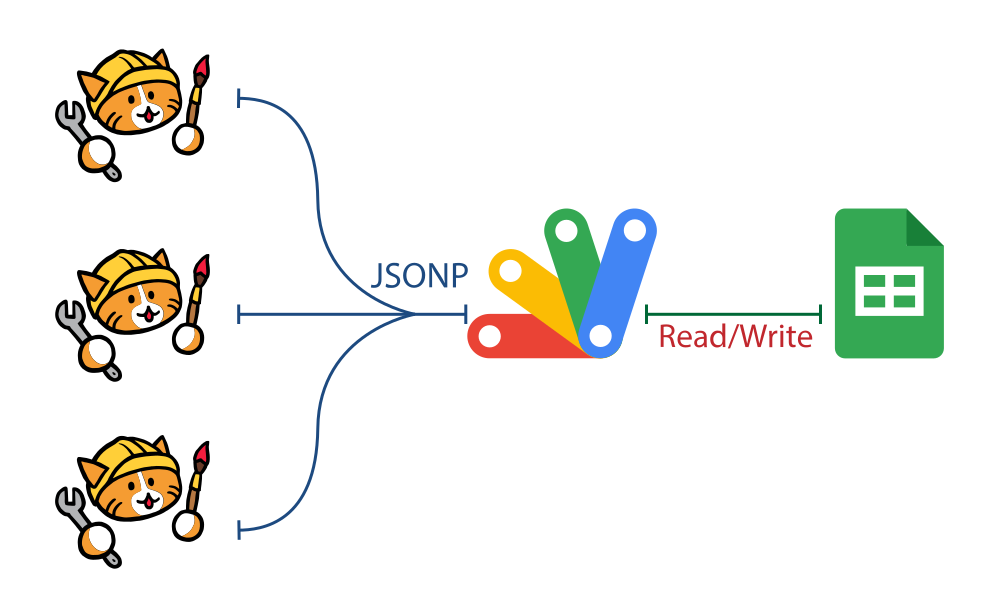
This part of my guide, is an extension of my previous guide on how I created a custom Guestbook using Google Apps Script as my backend and Google Sheet as my database. So, you would need that part to continue this guide.
To modify my Apps script to a comment system unique for a particular page, I need a new parameter page_url. This parameter would be use to filter data stored in Google Sheet. Also, if a comment is made on a particular page, then the page_url is stored in Google Sheet to identify the page where the comment come from.
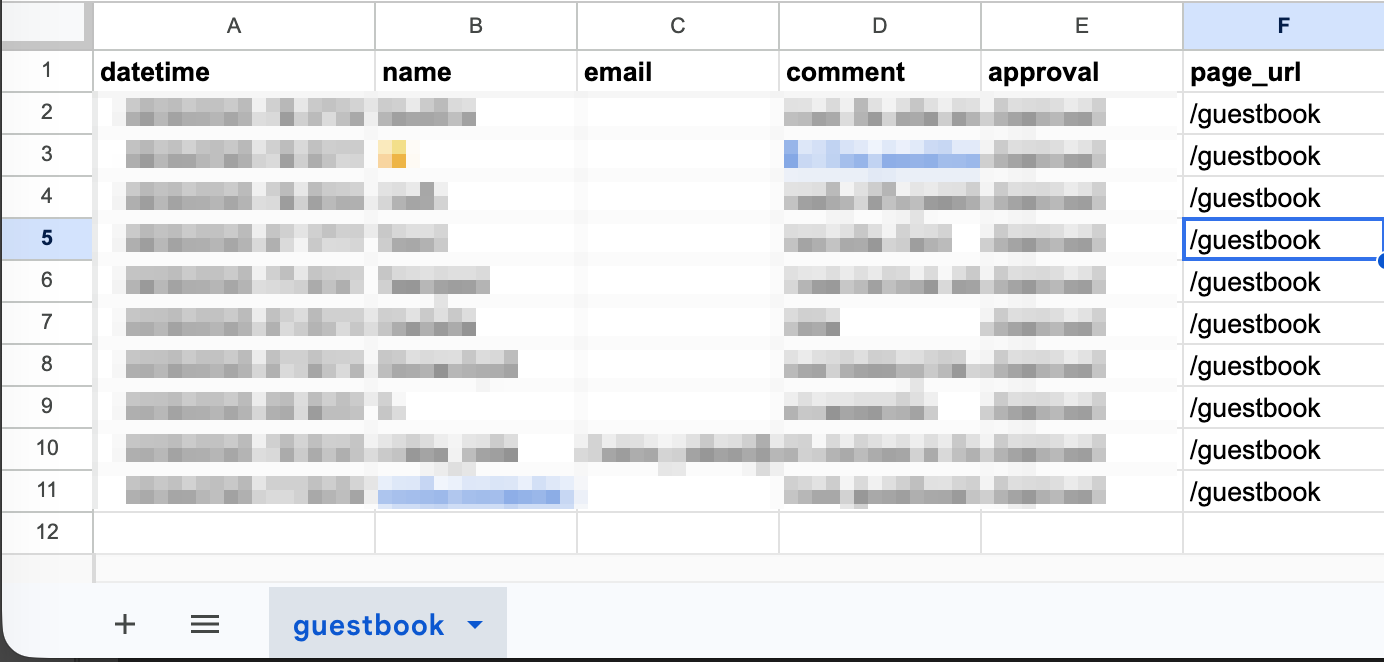
First Step: Modify my existing Google Sheet by adding a new column and give it a header page_url column with the text /guestbook. My Google sheet now looks like below.
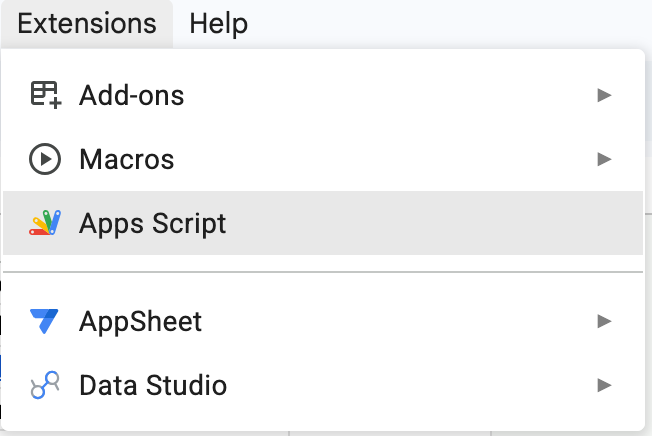
Second Step: Modify my existing Apps Script to accept new parameter. From top menu of Google Sheet open Extensions>Apps Script.
Now, I need to make changes on my previous functions. I have three functions - doGet(), saveData() and readData(). On doGet(), I need to check that parameter page_url should exist, if not, then return a "Invalid Request" message. To do that I just need to add an if..else statement as below:
//If page_url is passed then process data
if(e.parameter.page_url){
    // perform saveData() or readData()
}else{
    //Send invalid request
    responseData = ({ status:400, message: "Invalid Request" });
}
The above code would check if page_url parameter exist or not. If it exist then perform either readData() or saveData() as before. If the parameter does not exist, send a "Invalid Request" message. My doGet() function now look like below:
//doGet function changed
function doGet(e){
    let callback = e.parameter.callback;
    let responseData;

    //If page_url is passed then process data
    if(e.parameter.page_url){
        let data = e.parameter;

        // perform saveData() or readData()
        //If data write is requested and both name and comment is present
        if (e.parameter.name && e.parameter.comment){
            //save data to Sheet
            responseData = saveData(data);
        }else{
            //Read the guestbook and pass page_url variable
            responseData = readData(data.page_url);
        }
    }else{
        //Send invalid request
        responseData = ({ status:400, message: "Invalid Request" });
    }
    if (callback) {
        var output = callback + "(" + JSON.stringify(responseData) + ");";
        return ContentService.createTextOutput(output).setMimeType(ContentService.MimeType.JAVASCRIPT);
    }else {
        return ContentService.createTextOutput(JSON.stringify(responseData)).setMimeType(ContentService.MimeType.JSON);
    }
}
Save the changes. In Apps Script, even if I have saved changes, the Web App would not be deployed unless I do so. This is a good thing, because, I would not want any untested code to be deployed automatically. To allow my saveData() function to add the page_url parameter, an extra column is added to appendRow() function as below:
function saveData(data){
  let datetime = new Date();
  let name = data.name;
  let email = data.email || "";
  let comment = data.comment;
  let approval = "Pending";
  let page_url = data.page_url;

  try{
      sheet.appendRow([datetime, name, email, comment, approval, page_url]);
      responseData = ({ status: "success", message: "Thank you! Refresh this page to see your entry." });
  }catch(err){
      responseData = ({ status: "error", message: "There's an error saving your entry" });
  }
}
I can test this code by using Test Deployment link of Apps Script web app. To do that, Click Deploy > Test Deployments then copy the Web App Url. Paste the Url on a new browser tab, then at the end add ?name=John+Doe&comment=Test&page_url=/my-page and press enter. If there is no error, a new entry is present on Google Sheet. Next step is to modify readData() function to read data and filter via page_url parameter. I need to add a way to filter data on my readData() function as follows:
function readData(page_url){
  // Read Data from guestbook worksheet
  let data = sheet.getDataRange().getValues();
  let headers = data[0];
  let rows = data.slice(1);

  //Filter the rows data to match only those of page_url
  var filteredData = rows.filter(function(row) {
      // Since my page_url is on column F so index number is 5
      // A => 0, B => 1 ... F=>5 etc
      return row[5] == page_url;
  });

  // Map filteredData into structured objects
  let allComments = filteredData.map(function(row) {
    let obj = {};
    headers.forEach(function(header, index) {
      obj[header.toString().trim()] = row[index];
    });
    return obj;
  });

  return allComments;
}
Here the key important part is the function take in page_url parameter and filter all comments that has matching page_url data. I can test if this function works by clicking Deploy > Test Deployments and copy the Web App url. Paste the url on a new tab, and at the end add ?page_url=/my-page. This should return JSON data with the new added comment in the previous step. Change it to ?page_url=/guestbook and it should return all guestbook entries. Now, it is time to deploy the changes to my Web App, since till now, all changes are not live. To deploy, click /inc folder. I named my file as comments.js. I am reusing my Guestbook form with minor modification. This form can be added to any page that need a comment system.
<div class="comment-form">
    <form id="guestbookForm">
        <fieldset>
            <legend>Comments</legend>
            <label for="name">Name:</label>
            <input type="text" id="name" required placeholder="Your name or alias">
            <label for="email">Email (Optional):</label>
            <input type="email" id="email" placeholder="your@email.com">
            <label for="comment">Comment:</label>
            <textarea id="comment" rows="4" required placeholder="Leave a message!"></textarea>
            <button type="submit" class="btn-grad" id="submitBtn">Submit Comment</button>
            <p id="formStatus"></p>
        </fieldset>
    </form>
</div>
<div id="commentsContainer">Loading Comments...</div>
I need a way to send my current page url to my Web app. JavaScript has many ways to achieve this. I am using the .pathname function to send my page_url as follows:
// Add a const page_url that dynamically get the page path.
const page_url = window.location.pathname.replace('.html', '');
I then need to modify only two important lines of codes from my previous JavaScript code.
//Look for loadScript.src = `${GOOGLE_SCRIPT_URL}?callback=displayComments`;
//Change it to
loadScript.src = `${GOOGLE_SCRIPT_URL}?callback=displayComments&page_url=${page_url}`;

// an look for const submissionUrl = `${GOOGLE_SCRIPT_URL}?name=${name}&email=${email}&comment=${comment}&callback=handleSubmissionResponse`;
// Change it to
const submissionUrl = `${GOOGLE_SCRIPT_URL}?name=${name}&email=${email}&comment=${comment}&page_url=${page_url}&callback=handleSubmissionResponse`;
My full comments.js code is as follows:
// Using Google App Script for guestbook
const GOOGLE_SCRIPT_URL = "YOUR_GOOGLE WEB_APP_SCRIPT_URL_HERE";
// Add a const page_url that dynamically get the page path.
const page_url = window.location.pathname.replace('.html', '');
// READ FUNCTION: Handles displaying data on page load
function displayComments(comments) {
const container = document.getElementById('commentsContainer');
if (!comments || comments.length === 0) {
container.innerHTML = "<p>No guest has signed yet. Be the first to sign!</p>";
return;
}
container.innerHTML = "What Visitors Said...";
comments.reverse().forEach(item => {
const card = document.createElement('div');
card.className = 'comment-card';
card.innerHTML = `
<div class="comment-meta">${escapeHTML(item.name)}</div>
<div class="comment-text">${escapeHTML(item.comment)}</div>
`;
container.appendChild(card);
});
}
// Automatically load existing comments on page load
const loadScript = document.createElement('script');
loadScript.src = `${GOOGLE_SCRIPT_URL}?callback=displayComments&page_url=${page_url}`;
document.body.appendChild(loadScript);
// Handle Submission Response
function handleSubmissionResponse(response) {
const statusText = document.getElementById('formStatus');
const submitBtn = document.getElementById('submitBtn');
if (response.status === "success") {
statusText.style.color = "green";
statusText.innerText = response.message;
document.getElementById('guestbookForm').reset();
} else {
statusText.style.color = "red";
statusText.innerText = response.message;
}
submitBtn.disabled = false;
// Clean up
const tempScript = document.getElementById('tempSubmitScript');
if (tempScript) tempScript.remove();
}
// Save Guestbook signature
document.getElementById('guestbookForm').addEventListener('submit', function(e) {
e.preventDefault();
const submitBtn = document.getElementById('submitBtn');
const statusText = document.getElementById('formStatus');
submitBtn.disabled = true;
statusText.style.display = "block";
statusText.innerText = "Saving your entry...";
const name = encodeURIComponent(document.getElementById('name').value);
const email = encodeURIComponent(document.getElementById('email').value);
const comment = encodeURIComponent(document.getElementById('comment').value);
const submissionUrl = `${GOOGLE_SCRIPT_URL}?name=${name}&email=${email}&comment=${comment}&page_url=${page_url}&callback=handleSubmissionResponse`;
const submitScript = document.createElement('script');
submitScript.id = 'tempSubmitScript';
submitScript.src = submissionUrl;
document.body.appendChild(submitScript);
});
// Helper to prevent script injection (XSS)
function escapeHTML(str) {
if (!str) return '';
return str.toString().replace(/[&<>'"]/g,
tag => ({ '&': '&', '<': '<', '>': '>', "'": ''', '"': '"' }[tag] || tag)
);
}
Finally, on any page you want a comment system, just add the comment form and also include comments.js script. Hope, you could follow everything and get your guestbook extended to a comment system working. Leave a comment below.